
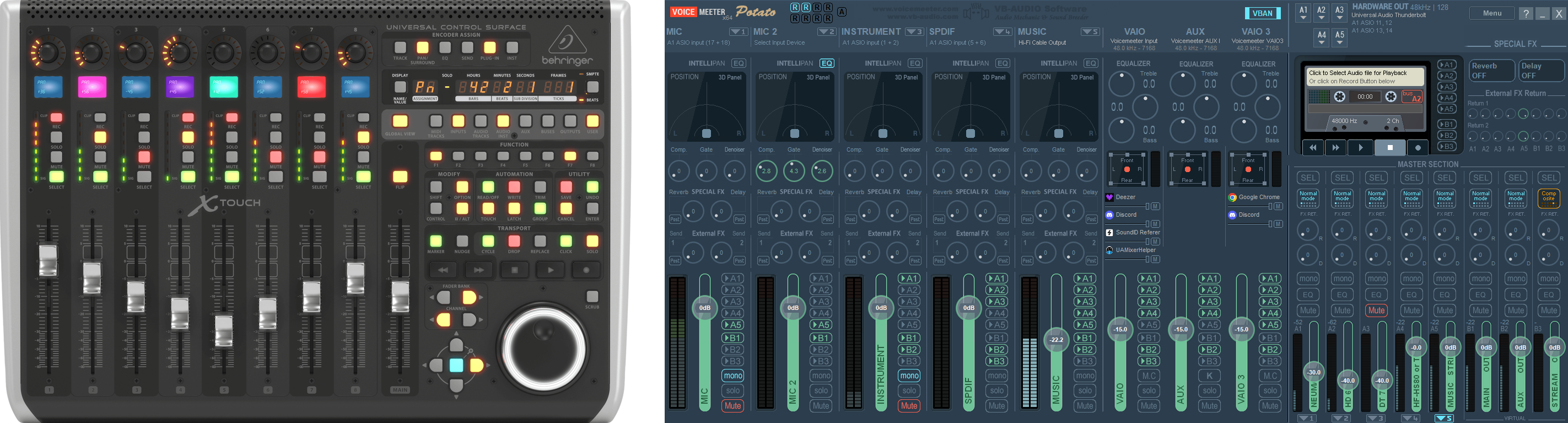
Behringer X-Touch universal control surface and Voicemeeter Potato mixer

VM-XCtrl

Voicemeeter ↔ Behringer X-Touch bridge — tactile mixing, meters, and scribble feedback over UDP (XCtrl mode).

VM-XCtrl maps the X-Touch’s faders, encoders, buttons, and scribble strips to VB-Audio Voicemeeter through the Voicemeeter API, with a UDP handshake in XCtrl mode. Run the surface in XCtrl / MCU mode and keep Voicemeeter on one layer while your DAW or other tools live on another — switch with the SMPTE button when you need to.

Download

Builds and release notes on GitHub Releases.

v.1.0.0.6 — API handling rework Latest

17 Jan 2026

  • Reworked startup flow for loading the Voicemeeter API.
  • Scans the default Voicemeeter install folder (C:\Program Files (x86)\VB\Voicemeeter) and locates required DLLs automatically — independent of a specific Voicemeeter version; tested with 3.1.1.9, 3.1.2.2, and intended for future releases.
  • Older Voicemeeter versions may work but are untested; legacy API differences can limit some features.
  • If DLLs are not found, you are prompted to pick the Voicemeeter installation folder manually.
  • Voicemeeter folder can be changed anytime from the tray icon context menu.
Older Versions

v.1.0.0.5 — Experimental Pre-release

25 Nov 2025

  • Possible fix for fader resistance when you move a fader suddenly or very quickly.

v.1.0.0.3

13 Oct 2025

  • Fixed: Possible crash when moving or touching faders on the BUSES layer.
  • Improved: Fader feedback on the BUSES layer (near-instant response).
  • Optimized: Scribble strip update performance on the BUSES layer.

v.1.0.0.2

13 Oct 2025

  • Fixed: Autostart path handling — with “Start on Login” enabled, you are prompted to specify the executable path added to system startup.
Features
  • Two main layers — Input (strips / channels) and Output (buses); switch without losing context.
  • Nine faders on Input — eight channel faders plus one master.
  • Channel metering — LED-style meters track Voicemeeter levels in real time.
  • Scribble strips — line 1 for channel names; line 2 for labels or live gain in dB while you ride a fader; colour palettes differ for Input, Output, and AUX layers.
  • Mute, Solo, Mono, M.C. — LED feedback mirrors Voicemeeter.
  • AUX (send) layer — pick a channel, then adjust sends to A1–A5 and B1–B3; RECORD buttons toggle sends; meters show the selected channel and relative send levels.
  • Preset recall — F1–F8 recall Voicemeeter snapshots with LED state.
  • Media transport — play / pause / next / previous send OS-level media keys; LEDs follow playback.
  • Connection robustness — UDP keep-alive, loss detection, and recovery; a “DISCONNECTED API” layer when Voicemeeter is offline, then automatic return when it’s back.
  • FLIP — toggles absolute vs relative fader mode.
  • Solo behaviour — when a channel is soloed, other mute LEDs blink like in Voicemeeter.
  • Layer readout — in single XCtrl mode, the timecode fields show the active layer name.
Requirements
  • VB-Audio Voicemeeter — Potato 3.1.1.9, Banana 2.1.1.9, or newer.
  • Behringer X-Touch — XCtrl, XCtrl-MCU, or XCtrl-HUI mode.
  • Network — PC and X-Touch on the same LAN with UDP allowed between them.
Getting started
  1. Put the X-Touch in XCtrl mode.
  2. Open Voicemeeter and enable the API.
  3. Launch VM-XCtrl; it discovers the surface and connects.
  4. Set the X-Touch IP in VM-XCtrl.
  5. On the X-Touch, set the PC IP (hover the tray icon in Windows — it shows your machine’s address).
  6. Mix Voicemeeter from the surface; use Gumroad for a license when you’re ready to go beyond evaluation limits described in the repo.